How AI is Changing Marketing Reporting (2026 Guide)
AI is transforming how marketers analyze data and build reports. Here's what's real, what's hype, and how to use AI tools effectively.
MetricNexus Team

Marketing reporting used to be tedious and slow. You'd spend hours every week pulling data from various platforms, combining it in spreadsheets, building charts, writing summaries, and hoping someone actually read the report. By the time you finished, the insights were a week old.
AI is fundamentally changing how this works. In 2026, you can ask natural language questions and get instant, accurate answers. AI surfaces anomalies you'd otherwise miss. Reports generate themselves. And the best part? It's not hype anymore—it's real and it's available today.
The numbers tell the story: 88% of marketers now use AI tools daily, and generative AI adoption in marketing grew 116% year-over-year. The AI marketing analytics market hit $47 billion in 2026 and is projected to reach $82 billion by 2030.
This guide separates what's actually useful from what's still mostly marketing noise. Whether you're a solo marketer or managing a team, here's what you need to know about AI marketing reporting in 2026.
The Old Way vs. The AI Way
The traditional marketing reporting workflow was built around limitations that no longer exist.
The Old Way looked like this:
- Monday morning: Export data from Google Ads, Facebook, email platform, and analytics
- Copy/paste into a spreadsheet (or wrestle with a BI tool like Tableau or Data Studio)
- Manually build charts and summaries
- Write narrative analysis explaining what happened
- Send report to stakeholders, hope they read it
- Repeat every single week or month
- When someone asks a custom question ("What about just e-commerce sales?"), you start over
This process took time. It was error-prone. By the time you finished, the data was stale. And you could only answer questions you'd anticipated in advance. Agencies report spending over 6 hours weekly on report compilation alone—costing upwards of $135,000 annually in labor for a 15-client agency.
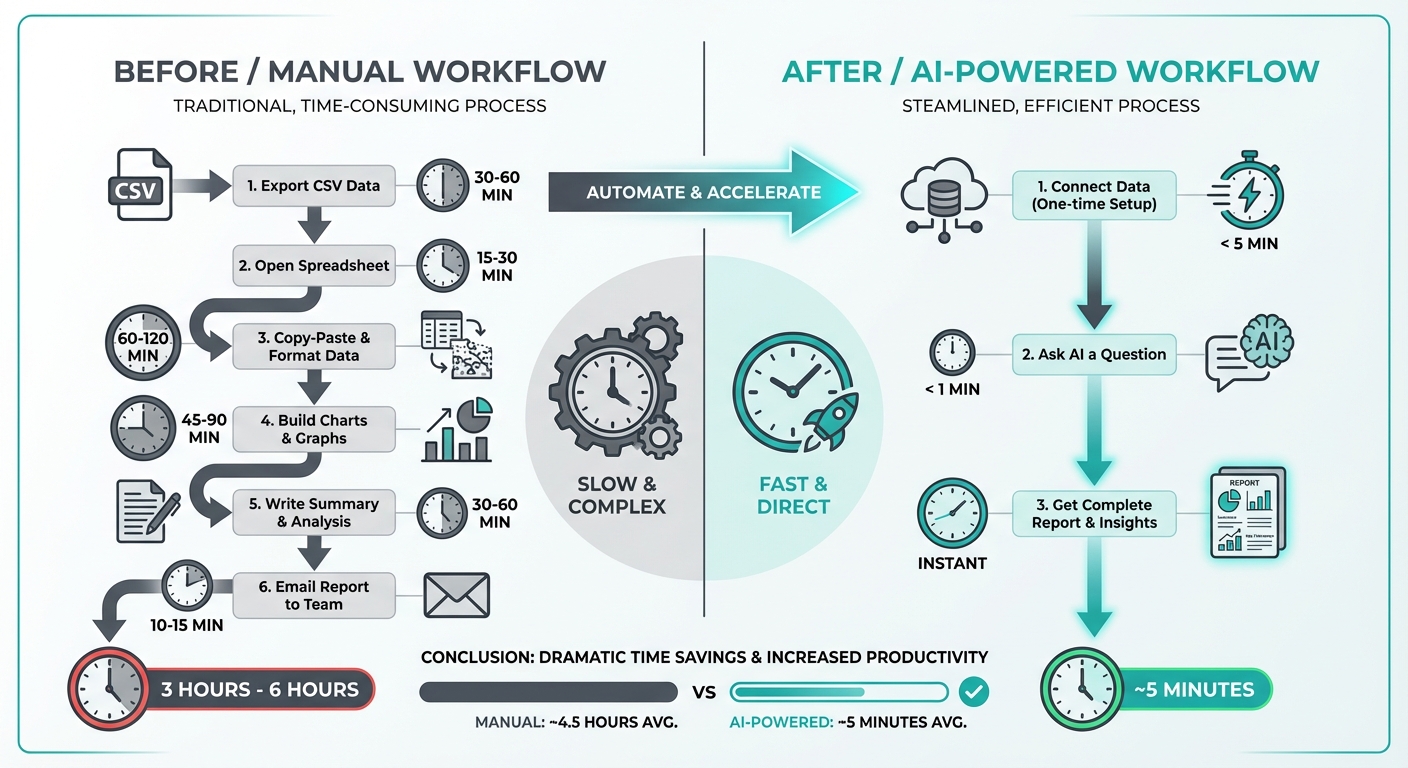 Before and after workflow comparison showing manual reporting process versus AI-powered automation
The AI Way is completely different:
Code block (markdown)You: "How did we do last week?"

AI: "Your week was strong overall. Revenue hit $47,300, up
14% week-over-week. Google Ads delivered a 4.5x ROAS with
your Search campaigns particularly strong. Facebook performed
better after you adjusted the audience targeting—CPA dropped
from $32 to $24.

One potential concern: Email engagement is down 8% compared
to the average of the last four weeks. Open rates haven't
changed, but click rates dropped. Might be worth checking
whether the recent subject line changes are resonating."
No exporting. No copy/paste. No manual charting. You asked a question in human language and got a comprehensive, insightful answer in seconds.
This is the transformation happening right now. And it's only the beginning.
What AI Marketing Tools Actually Do
Let's cut through the noise and talk about real capabilities that exist today. Organizations implementing AI marketing solutions report an average 300% ROI from combined revenue gains and cost savings.
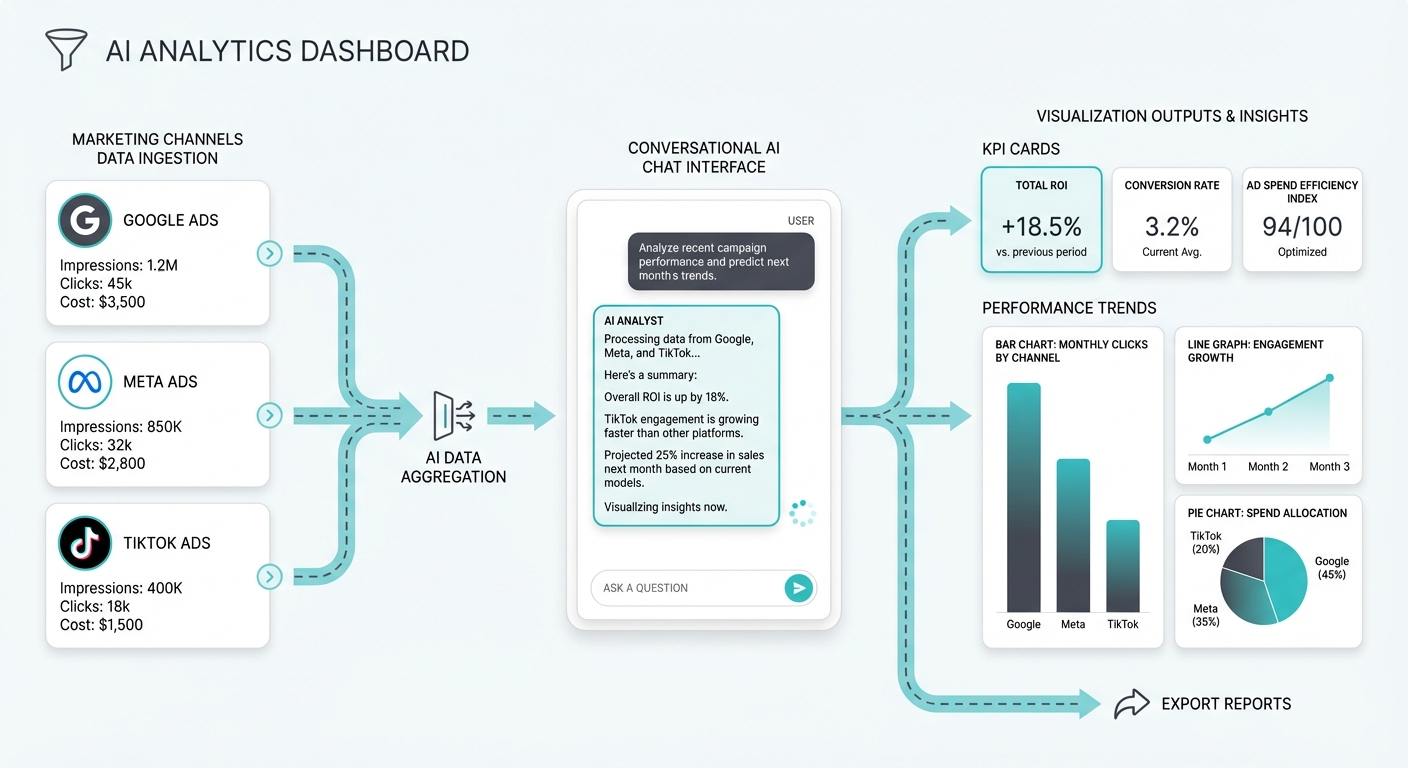 AI analytics dashboard showing data flowing from marketing channels through conversational interface to visualizations
Natural Language Queries
You can ask questions the same way you'd ask a colleague. No SQL, no learning dashboard navigation, no memorizing metric names.
Examples of what you can actually ask:
- "How did Facebook perform last week compared to the week before?"
- "Which campaigns have declining ROAS in the last 30 days?"
- "Show me our top-performing products by revenue last month"
- "What's our customer acquisition cost trending?"
- "Compare Q1 performance to Q1 last year by channel"
The AI tool queries your data, analyzes it, and explains the answer in human language. If the first answer doesn't have the detail you need, you just ask a follow-up question. Conversational data exploration replaces clicking through dashboards.
Automatic Anomaly Detection
The best insights often come from things that are wrong, not things that are right. AI can watch your data continuously and alert you to unusual patterns.
Real examples:
- "Your Google Shopping CTR dropped 32% in the last 24 hours across all product categories. This is unusual and might indicate a feed issue."
- "Email unsubscribe rate is at 0.8% today vs. 0.3% average. Something in the recent email may have caused higher opt-outs."
- "CPA on iOS campaigns jumped to $54 yesterday after being stable at $38. This correlates with iOS 17.3 privacy changes."
These aren't obvious to catch manually. An AI system watching your data catches them automatically and tells you what might be wrong.
Report Generation
Write once, reuse forever. You can ask the AI to generate reports in different formats for different audiences.
- Executive summary for leadership (high-level metrics, strategic implications)
- Detailed breakdown for the marketing team (channel performance, campaign analysis)
- Investor update (growth metrics, unit economics, benchmarks)
- Client deliverable (custom branding, performance proof, recommendations)
All from the same underlying data, generated in minutes instead of hours.
Predictive Analytics
"What's likely to happen next week?" is more valuable than "What happened last week?"
AI can forecast:
- Expected campaign performance based on spend and historical patterns
- Likely budget impact of scaling a successful campaign
- Predicted revenue based on current pipeline
- When you might hit seasonal peaks or valleys
These predictions are probabilistic, not perfect, but they're better than gut feeling.
What's Real vs. What's Hype
Let me be honest about what works and what doesn't, because your credibility depends on making good choices.
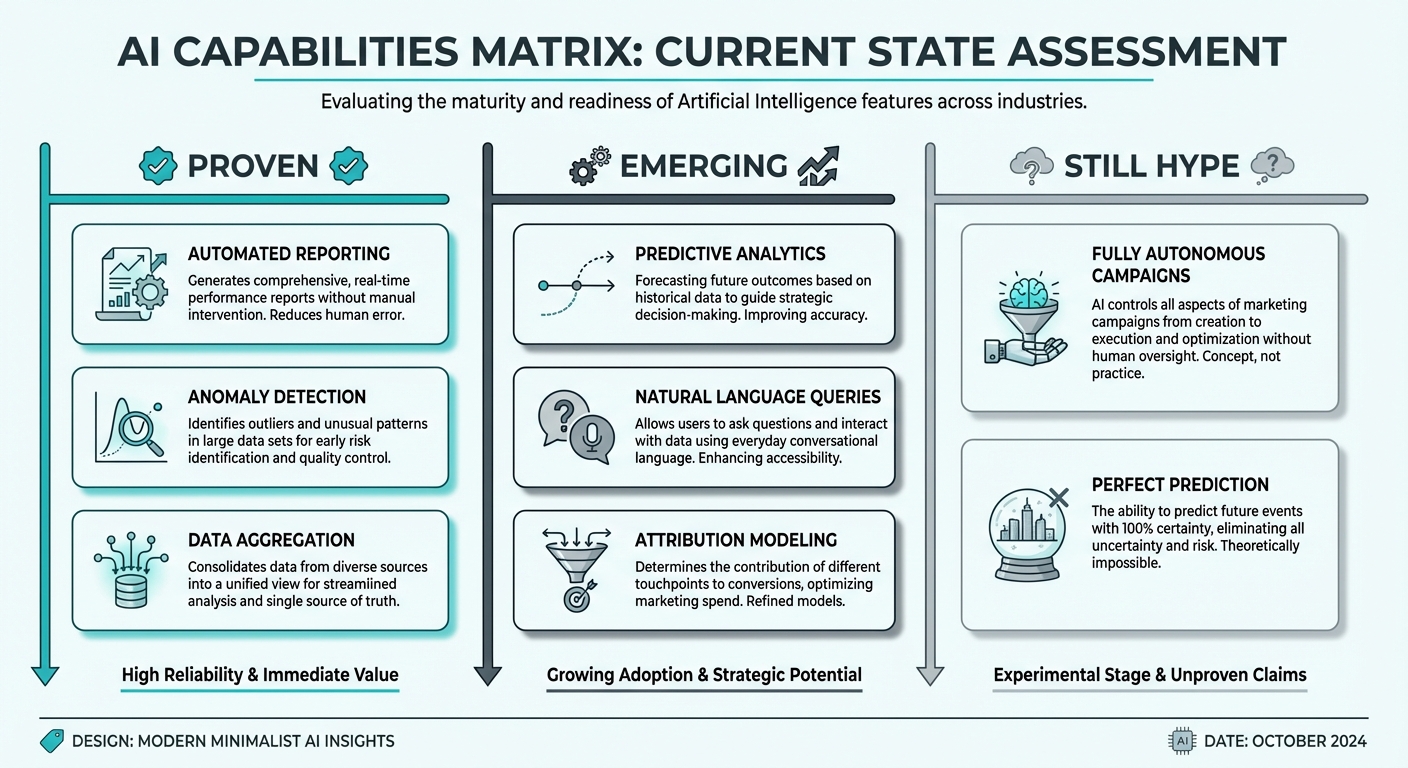 AI capabilities matrix showing proven, emerging, and still-hype features in marketing analytics
Real and Useful Right Now (2026)
Natural language data queries – This is the foundation. Asking questions in plain English instead of writing SQL or clicking through dashboards saves time and makes analysis accessible to non-technical teammates. This is proven, practical, and ROI-positive. AI-driven campaigns show 47% better click-through rates and 75% faster launch times compared to traditional methods.
Automated reporting summaries – AI can generate accurate summaries of your performance that are ready to share with stakeholders. Not perfect, but significantly faster than manual writing and more consistent in quality.
Basic anomaly detection – AI can monitor your data and flag unusual patterns. Good for catching major issues (CTR drops, spikes in CPA). Less reliable for nuanced context ("This 5% dip is actually normal for this time of year").
Chart and visualization generation – "Show me this data as a chart" works well. The AI picks appropriate visualizations and explains trends. Faster than building them manually.
Promising but Early (Still Improving)
Predictive budget optimization – "Here's how to allocate budget across channels next month" is theoretically possible but practically tricky. It works for simple, historical patterns but struggles when market conditions change. Use it as a suggestion, not gospel.
Automated campaign adjustments – Some platforms claim AI can adjust bids, audiences, or ad spend automatically. This is real in narrow cases (simple bid management) but sketchy in broader scenarios where business judgment matters. Automation is a long journey and we're in chapter 2.
Cross-channel attribution with AI – Traditional attribution models are crude. AI-based attribution sounds promising but relies heavily on data quality and often makes strong assumptions about customer behavior. We're getting better but this isn't solved yet.
Creative performance prediction – "This ad will perform well" or "Try this angle instead" is tempting to believe. The reality is that creative testing still beats prediction. AI can spot technical issues (low resolution, unclear copy) but predicting creative resonance is much harder than it sounds.
Still Mostly Hype
"Set it and forget it" AI marketing – The idea that you can just turn on AI and it handles everything is not real. AI works best when humans set strategy, establish guardrails, and review decisions. Marketing still needs humans.
AI that truly "understands" your business – Vendors love claiming their AI "understands your unique situation." It doesn't. AI is very good at pattern recognition across data but lacks real business understanding. You provide that.
Replacing human judgment entirely – The best outcomes come from humans + AI working together. AI is faster, humans have judgment and creativity. Don't try to replace humans; augment them.
Magic ROI improvement – If a vendor promises that AI will improve your ROI by some dramatic percentage, they're selling optimism, not software. AI improves efficiency, speed, and decision quality, which usually improves results. But "magic" doesn't exist.
How MCP is Changing AI + Marketing Data
Here's something most people don't understand yet: the way you connect AI to your marketing data matters enormously.
Model Context Protocol (MCP) is a new standard for connecting AI tools to data sources. Think of it as a bridge: on one side is an AI (Claude, ChatGPT, whatever), on the other side is your data.
Traditionally, you'd export data and paste it into ChatGPT, which is fragile and requires manual updates. Or you'd use a marketing platform's built-in AI features, which are limited to what that platform knows about.
MCP works differently. Your data stays where it is (or in a central location you control). The AI tool can query your data directly and run analysis. This is more secure, more current, and more flexible.
MetricNexus is built MCP-native from the ground up. Instead of bolting AI onto a traditional analytics tool, we built the whole thing around the idea that you should be able to talk to Claude or your favorite AI and have it query your real marketing data.
Why does this matter?
- Your data stays in your control – No exporting, no pasting. Your data lives where you decide.
- Always current – The AI is querying live data, not analyzing yesterday's export.
- Works with any AI – Because MCP is a standard, you can use whatever AI tool you prefer.
- Built for natural conversation – The AI understands marketing metrics natively, making questions easier to ask.
This is the architecture difference between AI-added (taking an old product and adding AI features) versus AI-native (building the whole system around how AI works).
Practical AI Marketing Use Cases
Let's get concrete with real examples of what this looks like in practice.
1. Instant Performance Checks
The scenario: You're in a meeting. Someone asks, "How did we do last week?"
The old way: "I'll send you that report later."
The AI way:
Code block (markdown)You: "How did we do last week?"

AI: "Strong week overall. You did $47,300 in revenue,
up 14% from the previous week.

By channel:
- Google Ads: $28,400 revenue, 4.5x ROAS, up from 4.1x last week
- Facebook: $12,100 revenue, 2.8x ROAS, up from 2.4x (better audience targeting is paying off)
- Email: $6,800 revenue, 8.2x ROAS, but engagement is down slightly
- Organic: $2,900 revenue, flat week-over-week

Notable: Your Search campaigns hit 62 conversions vs. 55 last week.
Cost per conversion dropped from $18.50 to $17.20. Worth scaling."
This happens in seconds. The AI has all your performance data and can explain what happened without you having to navigate a dashboard.
2. Anomaly Detection
The scenario: You're reviewing your data and something catches your eye. Rather than manually investigating, the AI flags it for you.
Code block (markdown)AI Alert: "Your Google Shopping CTR dropped 45% yesterday,
from 3.2% to 1.76%. This happened across all product categories.

Possible causes:
- Product feed issue (Check: are all product images loading?)
- Search volume spike (unlikely, search volume is normal)
- Ad position drop (Less likely, your avg position stayed at 1.8)
- Seasonal trend (Unlikely, didn't see this pattern last year)

Recommend checking your Google Merchant Center feed for image or
description errors. This is unusual and worth immediate attention."
Without AI, you might not notice this for hours. With anomaly detection, you catch it immediately when it happens.
3. Report Generation
The scenario: You need a monthly report for stakeholders.
The old way: Spend 2-3 hours building charts, writing narrative, explaining context.
The AI way:
Code block (markdown)You: "Generate a monthly performance report for the executive team"

AI: [Generates a formatted report with:
- Executive summary (headline metrics, key wins, risks)
- Performance by channel (Google Ads, Facebook, Email, Organic)
- Month-over-month comparison
- Key insights ("Facebook audience expansion is working,
  consider increasing budget here")
- Recommended actions ("Email CTR is declining, test new
  subject line approach")
- Forecast (Based on current trends, revenue projection for
  next month)
]
The report is ready to share in minutes, not hours. You can still refine it, but the skeleton is done.
4. Data Exploration
The scenario: You have a hypothesis and want to test it with data.
Code block (markdown)You: "Which audience segments have the best ROAS?"

AI: "Ranked by ROAS:
1. Existing customers (10.2x ROAS) - Most valuable by far
2. Lookalike audiences, age 25-34 (4.8x ROAS)
3. Interest-based, 'online business' (3.2x ROAS)
4. Remarketing, cart abandoners (8.1x ROAS)
5. Lookalike audiences, age 35+ (2.1x ROAS)"

You: "What about ROAS for products over $100 specifically?"

AI: [Refines analysis to just high-ticket products]
"Interesting pattern: for products over $100, existing customer
ROAS is 12.5x (even better), but lookalike audiences drop to 2.1x.
Suggests your lookalikes aren't finding high-ticket buyers."
You're having a conversation with the data. Follow-up questions are instant, not 10 minutes of manual analysis.
5. Competitive Insights
The scenario: You want to understand what competitors are doing.
Code block (markdown)You: "What messaging are our competitors using in their ad copy
right now? Any trends?"

AI: [With web access enabled]
"Monitoring your 5 main competitors' ads across Google and Facebook:
- 3/5 recently shifted from price-focused messaging to 'fast shipping'
- 2/5 emphasize 'trusted by 50,000+ businesses'
- Pricing comparison ads are declining (used to be 60% of their spend)
- All 5 are running similar holiday-themed campaigns

You're messaging around 'easy integration' which none of them are
emphasizing. That's a differentiation opportunity."
This requires AI with web browsing capability, but it's valuable competitive intelligence that's hard to gather manually.
Choosing an AI Marketing Tool
Not all AI marketing tools are created equal. Here's what to evaluate:
Critical questions to ask:
-
Does it connect to MY actual data? – This is the most important question. Tools that don't connect to your real data are limited. Can it pull from your Google Ads account, Facebook account, analytics, CRM?
-
Can I ask custom questions in natural language? – Stay away from tools that only have pre-built reports. You need flexibility to ask questions as they arise.
-
How current is the data? – Is it querying live data or is there a delay? For marketing, even a 24-hour delay can matter.
-
What's the privacy model? – Does your data go to a third-party model (OpenAI, Anthropic)? Can you use local models? This matters for sensitive business data.
-
Does it work with all my platforms? – You use multiple marketing tools. Can the AI access data across all of them, or just a few?
Red flags to avoid:
- "AI-powered analytics" with no actual data connection (just applying NLP to pre-computed metrics)
- Only pre-built reports with no custom question capability
- Requires significant data engineering to set up (should be easy for SMBs)
- Can't answer questions outside a narrow scope
- Unclear about how your data is stored or used
- Pricing that scales prohibitively (should be reasonable for SMBs)
AI Marketing Tools Landscape (2026)
Here's how the market is shaking out. Pricing varies widely: entry-level tools start around $9-29/month, mid-tier platforms run $69-190/month, and enterprise solutions range from $750 to $2,000+ monthly.
MCP-Native Platforms (The Future)
- MetricNexus – Built from the ground up on MCP. Connect to Claude or any AI. SMB pricing. Full natural language queries on your real data.
- Others are coming, but adoption is still early.
All-in-One Platforms Adding AI
- Funnel.io – Enterprise marketing analytics platform that's added AI features. Good if you're already there, but pricey and focused on enterprise.
Legacy Tools Adding AI Features
- Google Analytics Intelligence – GA's built-in AI feature. Free if you already use GA, but limited to what GA knows about.
- HubSpot AI features – Chatbot-like AI for CRM data and common HubSpot questions.
- Salesforce Einstein – Similar to HubSpot; data is limited to Salesforce.
Pure AI Analytics Platforms
- Narrative Science – Automated reporting focused on narrative generation. Works well for standardized reports.
- Tableau with Einstein – Salesforce's AI built into Tableau. Enterprise-focused.
The DIY Route: ChatGPT + Your Exports
- Load a CSV into ChatGPT and ask questions
- Works for occasional analysis or small datasets
- Manual and limited to what you remember to export
- No live data connection
- Actually pretty reasonable for occasional use, just not scalable
Getting Started with AI Marketing
You don't need to boil the ocean. Here's a practical path:
Step 1: Audit Your Current Data Stack
- What platforms do you use? (Google Ads, Facebook, email, CRM, analytics, etc.)
- Where does your data live?
- What reports do you currently create manually?
- What questions come up repeatedly that are hard to answer?
Step 2: Identify Pain Points
- Which reports take the most time?
- What questions do you ask most often?
- When do you need data most urgently?
- Where does manual work introduce errors?
Step 3: Start with Natural Language Queries
- Begin with simple questions you already know the answers to
- This lets you verify the AI is accurate before trusting it
- Gradually ask more complex questions
Step 4: Automate Recurring Reports
- Take the reports you create monthly (or weekly) and let AI generate them
- These are usually safe wins—you know what to expect, so you can spot errors
- This frees up hours every month
Step 5: Graduate to Predictive Features
- Once you're comfortable with the tool, explore forecasting
- Use predictions as inputs to decisions, not the decisions themselves
- Test and iterate
The key: Don't try to change everything at once. Pick one or two high-impact areas, prove value, then expand.
Limitations and Risks
I'm going to be honest about the downsides, because every technology has them.
AI can hallucinate (make stuff up)
LLMs are incredibly powerful but they can confidently state false information. This is especially risky with analytics—you need accurate answers. Mitigations:
- Always spot-check results against your dashboard
- Start with questions you already know the answer to
- Use tools with data validation built in
- Don't treat AI output as gospel, treat it as a starting point
Garbage in, garbage out
If your data is messy (duplicate records, misclassified events, inconsistent naming), AI will make decisions based on that garbage. Data quality matters more with AI, not less. Bad data produces confident but wrong answers.
Privacy considerations
If your data includes PII or sensitive business metrics, you need to care about how it's stored and processed. Some tools send data to third-party AI servers. Others keep it local. Make sure the architecture matches your privacy requirements.
Over-reliance risk
The worst outcome is teams becoming lazy and trusting AI without verification. You need humans who understand the business to review AI recommendations. The AI is fast; humans are wise.
Cost at scale
AI APIs aren't free. If you're querying hundreds of large datasets frequently, costs can add up. Most SMBs won't hit this problem, but it's worth thinking about growth.
Still needs human judgment
AI can give you the best answer to a technical question. It can't tell you whether pursuing that insight aligns with your strategy. Those decisions still require humans.
The Human + AI Partnership
This is the real promise of AI marketing: It's not about replacing humans. It's about humans working with AI and both being better.
What AI is best at:
- Speed (seconds vs. hours)
- Consistency (same quality every time)
- Scale (processing lots of data)
- Pattern recognition (finding signals in noise)
- 24/7 availability
What humans are best at:
- Judgment (Is this the right decision?)
- Creativity (What if we tried something different?)
- Understanding context (Why are we doing this?)
- Building relationships (Winning customer trust)
- Strategy (Where should we go?)
The right model:
- AI surfaces insights and generates options
- Humans review and decide
- Humans set strategy and guardrails
- AI executes and monitors
- Humans adjust strategy based on results
Example workflow:
- AI flags that a campaign's ROAS is declining
- Human decides whether to pause, adjust targeting, or investigate
- AI analyzes the data to help the human understand why
- Human makes a judgment call (maybe it's worth riding out short-term)
- AI monitors the decision and alerts if it needs adjustment
This partnership is more powerful than either alone.
What's Coming Next
AI in marketing is moving fast. Here's what's likely in 2026-2027:
Proactive AI assistants – Instead of you asking questions, the AI will tell you what matters. "Your CAC is climbing and I think it's because…" Things surface automatically, not just on request.
Automated optimization with guardrails – More systems will optimize automatically (budget allocation, bid management, audience targeting) but with human-set guardrails. "Optimize within these bounds, don't change this, ask before doing that."
Better cross-platform attribution – The old last-click attribution is dying. AI-based multi-touch attribution will get more sophisticated and actually useful.
Voice-based reporting – "Hey, what happened with our campaigns last week?" will work in the car, on a walk, wherever.
Real-time everything – Reporting and alerts will move from hourly/daily to truly real-time (within minutes).
These are coming soon, not in 5 years. But they're also not here yet, so manage expectations.
FAQ
Q: Can AI replace marketing analysts?
Not entirely, but it will change the role. Junior analysts spend lots of time on reporting and data pulls—AI will automate that. Senior analysts do judgment, strategy, and creative work—that's hard to automate. The role evolves, not disappears. Teams will get smaller but more strategic.
Q: What's the best AI marketing tool?
Depends on your stack, but the right question is: "Does it connect to my data?" More important than the tool is having tools that integrate with your existing platforms and let you ask natural language questions. If you're starting fresh, MCP-native platforms like MetricNexus are worth a look.
Q: Is AI marketing reporting accurate?
Accurate enough to be useful, not accurate enough to be blindly trusted. AI can calculate metrics correctly but might miss nuance ("This 10% dip is normal for this time of year"). Use it for speed and breadth, but verify important conclusions.
Q: How do I connect ChatGPT to my marketing data?
Export your data and paste it into ChatGPT. It works but it's manual and doesn't scale. For live, continuous access, use a platform built for it. ChatGPT alone is good for occasional analysis, not for real-time reporting.
Q: What if the AI gives me the wrong answer?
Spot-check against your dashboards. Start with questions you know the answer to. Build verification into your workflow. And remember: AI is a tool to augment human judgment, not replace it.
Getting Started with MetricNexus
MetricNexus is built for marketers who want AI that actually works, not marketing theater.
Why MetricNexus:
- AI-native, not AI-added – Built from the ground up on MCP, not bolted onto an old platform
- Works with Claude – Connect to Claude (or any AI) and query your actual marketing data in natural language
- SMB pricing – Designed for small businesses and individuals, not enterprise only
- Your data, your control – Stays in your control, no forced exports or data processing elsewhere
You can:
- Ask questions about all your marketing data (Google Ads, Facebook, email, analytics, whatever you track)
- Get instant performance summaries without navigating dashboards
- Generate monthly reports in seconds
- Spot anomalies before they become problems
- Explore data conversationally
Getting started:
- Connect your marketing data sources
- Ask a question in plain English
- Get an accurate, insightful answer
- Scale from there
It's marketing reporting for the AI age. No SQL. No waiting. No hoping someone reads the report. Just questions and answers.
Start free and see how it works with your data: MetricNexus.
Have questions about AI marketing or want to discuss your specific situation? Drop us a note—we love talking about this stuff and hearing how teams are actually using AI to work smarter.
Related Posts
The Complete Guide to Marketing Data (For Non-Technical Teams)
Everything you need to know about marketing data - without the jargon. A practical guide for marketers who aren't data engineers.
Marketing Attribution Explained (Finally, in Plain English)
Marketing attribution doesn't have to be complicated. Here's what it means, why it matters, and how to actually use it - without a PhD in statistics.

SMB Marketing Benchmarks 2026: What 'Good' Actually Looks Like
Marketing benchmarks specifically for small businesses. Real data on ROAS, CAC, conversion rates, and more - not enterprise metrics.
Ready to see your marketing data?
Start your free trial today. See your data in 5 minutes.
Start Free Trial