Coupler.io Alternatives: Simpler Data Integration Tools
Looking for a Coupler.io alternative? Compare 7 data integration tools with features, pricing, and use case recommendations.
MetricNexus Team

Coupler.io has become the go-to data integration tool for marketing teams who want to pull data into Google Sheets without touching code. Its free tier, simple interface, and broad connector library have made it popular among small businesses and agencies.
But Coupler isn't perfect for everyone. If you're finding yourself frustrated by row limits, manual refresh requirements, or searching for AI-powered query capabilities, it might be time to explore alternatives that better fit your specific workflow.
This guide breaks down seven solid Coupler.io alternatives—from budget-friendly options to enterprise-grade platforms—and helps you pick the right one based on your needs.
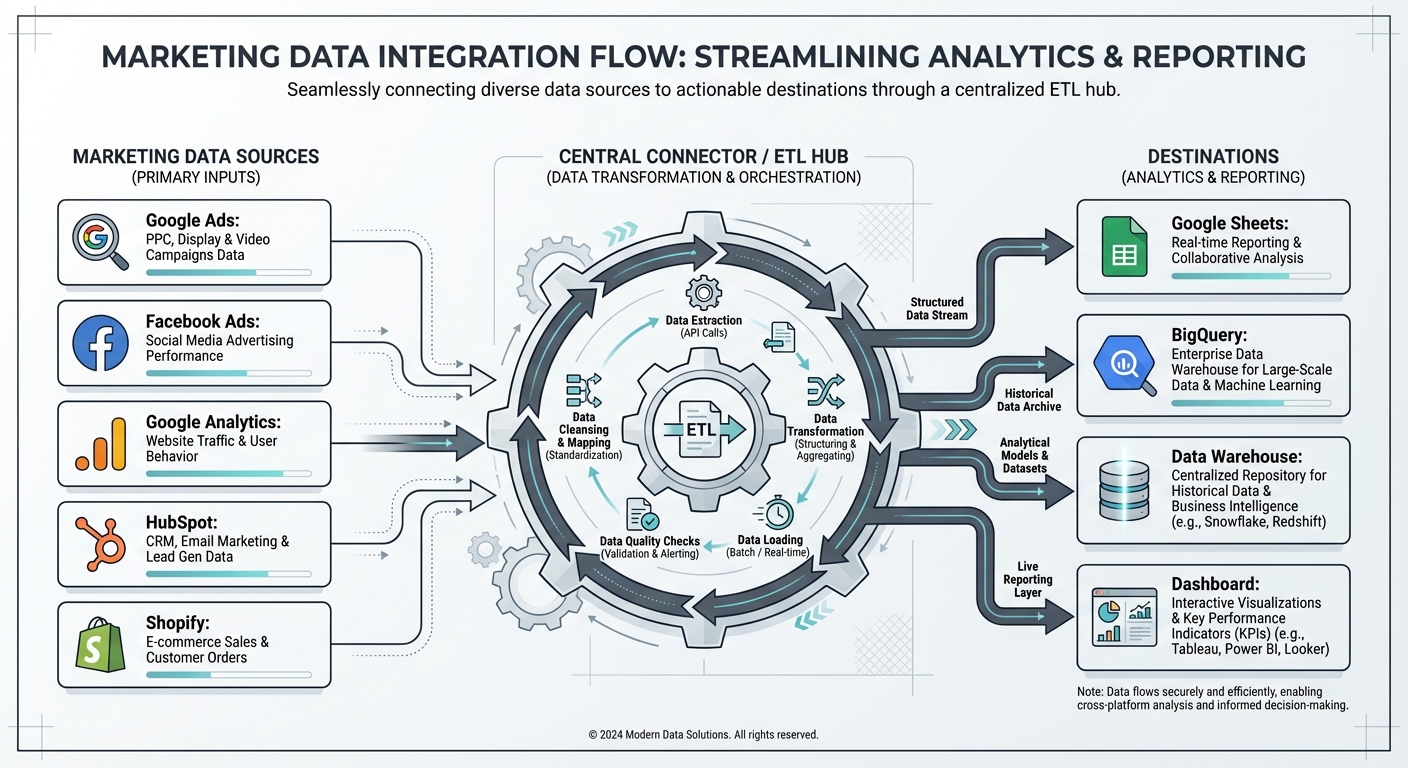 Data integration flow showing marketing sources connecting to various destinations
Why People Look for Coupler.io Alternatives
Before we dive into alternatives, let's be clear: Coupler.io is a good product. But it has legitimate limitations that push teams to look elsewhere.
Free Tier Constraints
Coupler's free plan maxes out at 1,000 rows per month with manual refresh only. If you're running multiple reports or syncing data daily, you'll quickly hit the limit. Paid plans start at $24/month, but costs scale up quickly based on the number of data connections—each YouTube channel, for example, requires 6 separate connections.
Manual Refresh on Free Plan
Unlike some competitors, Coupler's free tier requires you to manually trigger refreshes. For teams on tight budgets wanting automation, this means spending time on repetitive tasks instead of analyzing data.
Limited Visualization & Querying
Coupler pipes data into Sheets, but if you want to query that data with natural language, apply AI-driven analysis, or build advanced visualizations, you're limited to Sheets' native functions. No AI layer, no fancy dashboards.
Single Destination Focus
If you need data in multiple places—BigQuery, your data warehouse, a BI tool, Looker Studio—Coupler's "everything to Sheets" approach becomes a bottleneck.
Smaller Marketing Connector Library
Coupler supports 380+ apps, which is respectable. But if you use niche marketing tools (newer ad platforms, attribution software), your specific integration might not exist or might be poorly maintained. And some connectors are read-only—you can import data but not write back to the source.
Per-Connection Pricing Model
Unlike competitors that charge per user or data source, Coupler charges per data connection. This creates expensive scenarios for businesses with multiple data flows from the same platform—a single YouTube channel analysis might require 6 connections for different data types.
These pain points don't make Coupler bad—they just mean it's not the right fit for every team. Let's look at what's available instead.
Quick Comparison
| Tool | Best For | Free Tier | Starting Price | Key Advantage |
|---|---|---|---|---|
| MetricNexus | AI-queryable marketing data | Yes | $49/mo | Ask data questions in plain English |
| Supermetrics | Large teams, maximum integrations | Trial only | $29/mo | 500+ connectors, most complete library |
| Windsor.ai | Marketing attribution & optimization | Yes | $19/mo | Most affordable, 325+ connectors, attribution modeling |
| Porter Metrics | Looker Studio-first teams | Limited | $12.50/mo per connector | Native Looker Studio design, templates |
| Airbyte | Technical teams, open source preference | Self-hosted free | $70+/mo (cloud) | 550+ connectors, full control |
| Stitch Data | Data warehouse integration | Yes (limited) | Usage-based | Enterprise-grade, Talend-backed |
| Coefficient | Spreadsheet power users | Yes | $49/mo | Live two-way sync with Sheets |
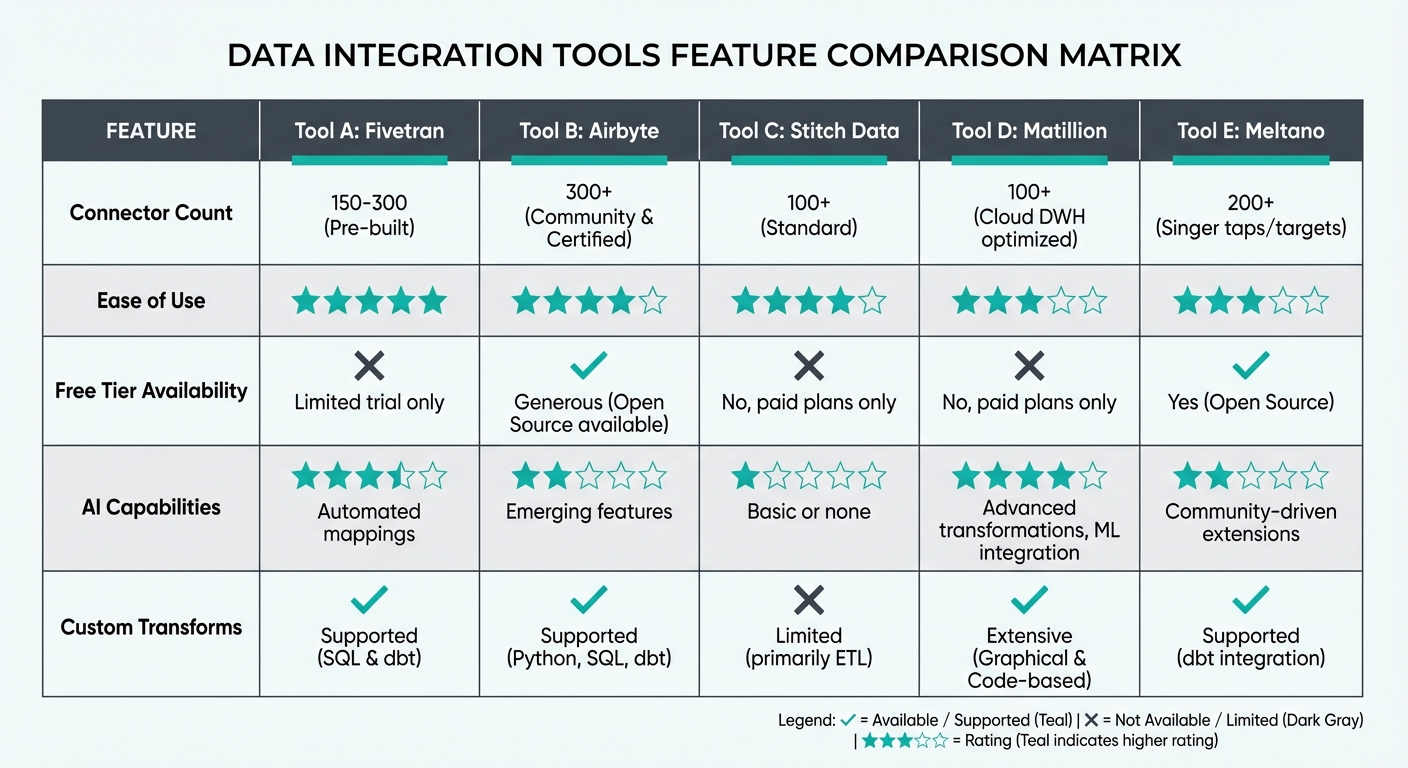 Feature comparison showing connector counts, ease of use, free tiers, and AI capabilities across tools
1. MetricNexus: Best for AI-Powered Data Queries
MetricNexus is built for teams that want to treat their marketing data like a database—without needing SQL knowledge.
How It's Different
Instead of manually building reports in Sheets, you ask MetricNexus questions in plain English. "What's my conversion rate by channel this month?" or "Which ad campaigns have the highest ROAS?" The system queries your connected data sources and returns structured answers.
It's Coupler.io's opposite: Coupler is destination-focused (get data into Sheets), while MetricNexus is query-focused (ask questions of your data).
Key Features
- AI-powered natural language queries - Ask "What was our CAC last quarter?" and get an answer with context
- Marketing-native integrations - Deep connectors with Google Ads, Facebook, Shopify, Stripe, and 40+ marketing platforms
- Real-time data - Queries run against live data (no refresh delay)
- Shareable dashboards - Generate insights and embed them in presentations or reports
- Free tier included - 100 queries/month on the free plan
Pricing
- Free: $0 (100 queries/month)
- Professional: $49/month (2,000 queries/month)
- Business: $149/month (unlimited queries)
Advantages Over Coupler
- AI-native query engine (Coupler = static reports)
- No row limits or manual refreshes
- Faster for dynamic analysis
- Better for marketing teams specifically
When MetricNexus Falls Short
- Fewer non-marketing integrations (Coupler has 150+, MetricNexus has 40+)
- Requires cloud hosting (some enterprises need self-hosted)
- Not ideal if you need raw data in Sheets for pivots and custom formulas
Bottom Line: MetricNexus wins if you spend more time analyzing data than building custom reports. If your team asks questions like "Is this campaign working?" constantly, the AI query engine saves time.
2. Supermetrics: Best for Teams That Need Everything
Supermetrics is the heavyweight champion of data integration. It's been around since 2010 and is used by thousands of agencies and enterprises.
How It's Different
Supermetrics isn't trying to be clever—it's trying to be comprehensive. 500+ connectors, support for Sheets, Google Analytics, Looker Studio, and multiple destinations. It's the tool you pick when "Which integrations does it have?" is your primary question.
Key Features
- 500+ connectors - Largest library of any tool here (Google Analytics, all ad platforms, e-commerce, CRM, etc.)
- Multi-destination support - Sheets, Looker Studio, BigQuery, PowerBI, Tableau, Snowflake
- Scheduled reports - Automate report building and delivery (hourly, daily, weekly)
- Template library - Pre-built reports for common use cases
- Advanced filtering - Complex data transformations at sync time
- API access - Developers can build custom integrations
- 15+ years of maturity - Used by 750,000+ marketers globally
Pricing
- Free: None (14-day trial only)
- Professional: $29-79/month (tiers by data volume)
- Business: $159-239/month
- Enterprise: Custom pricing
There's no free tier, which is a key difference from Coupler.
Advantages Over Coupler
- Far more connectors (500 vs. 150)
- Multi-destination support
- Enterprise features (custom dashboards, advanced scheduling)
- 15+ years of maturity
When Supermetrics Falls Short
- No free tier (trial only)
- Steeper learning curve for beginners
- Higher price point for smaller teams
- Can feel over-engineered if you only need basic syncs
Bottom Line: If you have budget and need maximum connector coverage, Supermetrics is the safe choice. It's what marketing agencies use when they can't afford integration gaps.
3. Windsor.ai: Best for Marketing Attribution
Windsor.ai positions itself as "the data warehouse for marketing teams." It's laser-focused on marketing workflows and exceptionally affordable.
How It's Different
Windsor.ai includes attribution modeling out of the box—something most competitors charge extra for or don't offer at all. You can see not just what channels drive sales, but which touch points matter most.
Key Features
- Multi-touch attribution - Understand the full customer journey with linear and time-decay model comparison
- 325+ marketing integrations - All major ad platforms, analytics, e-commerce, CRM
- Automated reporting - Send stakeholders daily/weekly reports with 100+ templates
- Connector-level data warehouse - Your data lives in Windsor, not just Sheets
- AI-powered marketing insights - Automated recommendations for budget allocation
- No premium connectors - All integrations available on all pricing tiers
Pricing
- Free: $0 (5 connectors, manual refresh)
- Essential: $19/month (10 connectors, daily refresh)
- Professional: $99/month (unlimited connectors)
- Enterprise: Custom
The free tier is genuinely useful—more forgiving than Coupler's 500-row limit.
Advantages Over Coupler
- Built-in attribution (Coupler = no attribution)
- Cheaper than Coupler's paid plans ($19/mo vs $24/mo)
- More generous free tier
- Purpose-built for marketing teams
- All connectors on all plans (no premium upsells)
When Windsor.ai Falls Short
- Data lives in Windsor by default (more vendor lock-in than Coupler)
- Less suitable if you need non-marketing integrations (accounting, HR, etc.)
- Limited Sheets integration compared to Coupler
- Smaller community and fewer third-party resources
Bottom Line: Windsor.ai is the budget pick for marketing teams who specifically care about attribution. If your main question is "Which marketing channel should I invest in?" this tool answers it directly.
4. Porter Metrics: Best for Looker Studio Users
Porter Metrics is built specifically for Google Looker Studio (formerly Data Studio). If you've invested in Looker Studio dashboards, this tool is designed to make your life easier.
How It's Different
While most integration tools treat Looker Studio as just another destination, Porter Metrics is Looker Studio-native. It includes pre-built Looker Studio templates and optimizes data connectors specifically for Looker's requirements.
Key Features
- 50+ connectors (all major marketing platforms)
- Looker Studio templates - Drop-in dashboard templates for common use cases
- Live data refresh - Real-time sync to Looker Studio
- Automated scheduling - Set and forget data updates
- Lightweight - Fewer features than competitors, but simpler UX
Pricing
- Free: None (limited trial)
- Pay-per-connector: $15/month per active connector
- Example: 5 connectors = $75/month
Pricing can feel high if you have many sources, but low if you have just 2-3.
Advantages Over Coupler
- Optimized for Looker Studio (Coupler treats it as secondary to Sheets)
- Native template library
- Simpler interface for dashboard-building teams
When Porter Metrics Falls Short
- Only works with Looker Studio (no Sheets, BigQuery, etc.)
- Limited connector library compared to Supermetrics
- Per-connector pricing gets expensive at scale
- Less suitable for non-Looker workflows
Bottom Line: If you're a Looker Studio shop, Porter Metrics is worth a trial. If you use Sheets, BigQuery, or other destinations, look elsewhere.
5. Airbyte: Best for Technical Teams & Open Source
Airbyte is the open-source champion. If your team has engineering resources and wants maximum control, this is the platform to consider.
How It's Different
Airbyte is fundamentally different: it's open source and self-hosted (with a cloud option). You're not relying on a SaaS vendor's infrastructure—you control the entire pipeline.
Key Features
- 550+ connectors - Largest open-source library, approaching Supermetrics territory
- Open source - Code is public, community-driven development
- Self-hosted option - Run on your own infrastructure (data never leaves your servers)
- ELT architecture - Load raw data first, transform later
- Connector Development Kit - Build custom connectors in under 30 minutes
- Webhooks & API - Programmatically trigger syncs
- Enterprise features - Advanced permissions, audit logs, 99.9% SLA on cloud tier
Pricing
- Self-hosted: Free (you pay for hosting)
- Cloud - Starter: $70/month (base fee)
- Cloud - Professional: $250/month
- Enterprise: Custom
Advantages Over Coupler
- Open source (full transparency, no vendor lock-in)
- Self-hosted option (data never leaves your infrastructure)
- 550+ connectors with active community development
- Built for data warehouse workflows
- Capacity-based pricing often more cost-effective than per-connection
When Airbyte Falls Short
- Steeper learning curve (requires technical setup)
- Smaller marketing connector library than Coupler
- Requires infrastructure knowledge (hosting, deployment)
- No native Sheets support (you'd need BigQuery or warehouse first)
- Overkill for simple use cases
Bottom Line: Airbyte is for teams with engineering resources who want to own their data pipeline. Not ideal for non-technical teams or Sheets-first workflows.
6. Stitch Data: Best for Data Warehouse-First Teams
Stitch Data (owned by Talend) positions itself as an enterprise-grade platform for teams building data warehouses.
How It's Different
Stitch is designed for a specific workflow: extract data from many sources, load it into a data warehouse (Snowflake, BigQuery, PostgreSQL), then analyze it with BI tools. It's not trying to put data in Sheets—it's trying to build a single source of truth.
Key Features
- 130+ connectors - Solid coverage, though behind Supermetrics
- Data warehouse focus - Optimized for Snowflake, BigQuery, Redshift
- Automatic schema detection - Figures out data structure on its own
- Incremental sync - Only moves new/changed data (cost-efficient)
- Column-level transformations - Light ETL capabilities built-in
- Talend backing - Enterprise company, not a startup
Pricing
- Free: Yes (limited, ~10GB/month)
- Paid: Usage-based, typically $100-500/month depending on data volume
Advantages Over Coupler
- Enterprise-grade reliability
- Data warehouse approach (Coupler = Sheets approach)
- More cost-efficient at scale
- Talend backing (not venture-backed startup risk)
When Stitch Data Falls Short
- No Google Sheets destination (only warehouses)
- More expensive than Coupler at lower volumes
- Overkill if you just need Sheets
- Requires data warehouse setup
Bottom Line: Stitch is for mature teams that have already decided on a data warehouse. If that's you, it's solid. If you're looking for a Sheets replacement, it's oversized.
7. Coefficient: Best for Spreadsheet Power Users
Coefficient is what happens when you build integration tools for people who live in Excel and Sheets. It focuses on live, two-way data sync.
How It's Different
Instead of periodic batch syncs, Coefficient keeps Sheets data live and linkable back to source systems. Update a value in Sheets, and it propagates back. It's truly a "live" integration.
Key Features
- Two-way sync - Sheets ↔ CRM/database sync
- Live data - Real-time updates, no refresh required
- Native Sheets formula - Query data directly in cells like a database
- 40+ connectors - CRM, accounting, e-commerce, databases
- No code required - Point-and-click setup
- Free tier - Generous starting point
Pricing
- Free: $0 (limited connectors and rows)
- Basic: $49/month (unlimited connectors, limited rows)
- Professional: $149/month (unlimited everything)
Advantages Over Coupler
- Two-way sync (Coupler is one-way only)
- Live updates (Coupler requires refresh)
- Better for CRM workflows
- Same price, more features
When Coefficient Falls Short
- Sheets-only destination (no BigQuery, Looker Studio, etc.)
- Smaller connector library
- CRM-focused (not as strong for analytics tools)
- Live sync can create dependency on connectivity
Bottom Line: If you're a Sheets power user who also uses a CRM, Coefficient might be a direct upgrade from Coupler. The two-way sync is genuinely useful for teams managing data in spreadsheets.
Feature Comparison Matrix
| Feature | Coupler | MetricNexus | Supermetrics | Windsor.ai | Porter | Airbyte | Stitch | Coefficient |
|---|---|---|---|---|---|---|---|---|
| Connectors | 380+ | 40+ | 500+ | 325+ | 50+ | 550+ | 130+ | 40+ |
| Google Sheets | ✅ Full | ⚠️ Export | ✅ Full | ✅ Full | ❌ No | ❌ No | ❌ No | ✅ Full |
| Looker Studio | ✅ Yes | ❌ No | ✅ Yes | ❌ No | ✅ Native | ❌ No | ❌ No | ❌ No |
| BigQuery | ✅ Yes | ❌ No | ✅ Yes | ❌ No | ❌ No | ✅ Yes | ✅ Yes | ❌ No |
| Free Tier | ✅ Yes | ✅ Yes | ❌ No | ✅ Yes | ❌ No | ✅ Yes | ✅ Yes | ✅ Yes |
| Scheduled Refresh | ✅ Paid | ✅ Yes | ✅ Yes | ✅ Yes | ✅ Yes | ✅ Yes | ✅ Yes | ✅ Yes |
| Real-time/Live | ❌ No | ✅ Yes | ⚠️ Polling | ⚠️ Daily | ✅ Yes | ✅ Yes | ✅ Yes | ✅ Yes |
| AI Queries | ❌ No | ✅ Yes | ❌ No | ❌ No | ❌ No | ❌ No | ❌ No | ❌ No |
| Two-way Sync | ❌ No | ❌ No | ❌ No | ❌ No | ❌ No | ❌ No | ❌ No | ✅ Yes |
| No Code Setup | ✅ Yes | ✅ Yes | ✅ Yes | ✅ Yes | ✅ Yes | ⚠️ Limited | ⚠️ Limited | ✅ Yes |
| Self-hosted | ❌ No | ❌ No | ❌ No | ❌ No | ❌ No | ✅ Yes | ❌ No | ❌ No |
Pricing Comparison
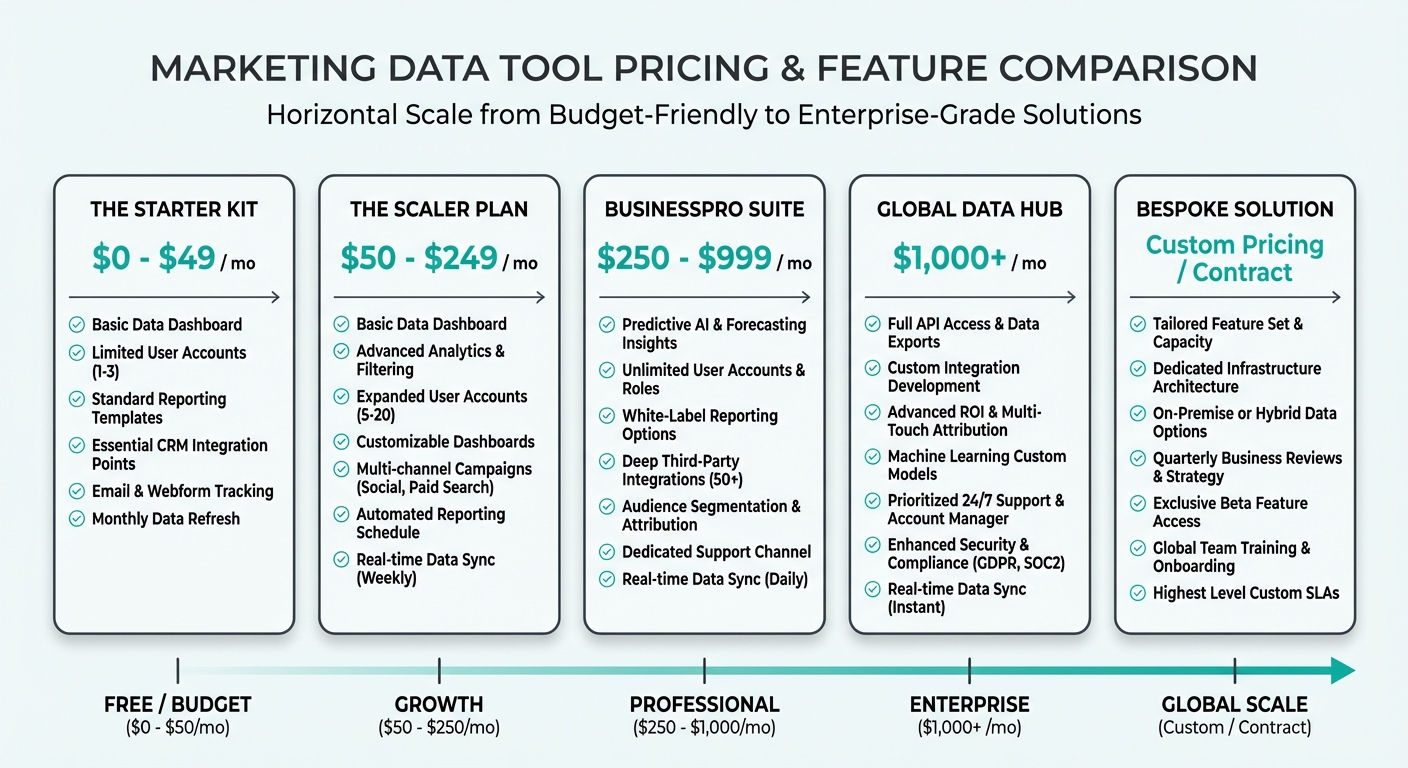 Pricing tiers showing tools from budget to enterprise pricing
| Tool | Free | Basic | Pro | Enterprise | Notes |
|---|---|---|---|---|---|
| Coupler | $0 (1,000 rows/mo) | $24/mo | $49-99/mo | Custom | Per-connection pricing adds up |
| MetricNexus | $0 (100 queries/mo) | $49/mo | $149/mo | Custom | Query-based pricing |
| Supermetrics | ❌ Trial only | $29-79/mo | $159-239/mo | Custom | Volume-based, no free tier |
| Windsor.ai | $0 (5 connectors) | $19/mo | $99/mo | Custom | Most affordable, all connectors included |
| Porter Metrics | Limited trial | $12.50/connector/mo | — | Custom | Per-connector pricing |
| Airbyte | Self-hosted free | Cloud: $70/mo | $250/mo | Custom | Self-hosted = no SaaS fee |
| Stitch Data | $0 (10GB/mo) | Usage-based | Usage-based | Custom | Typically $100-500/mo |
| Coefficient | $0 (limited) | $49/mo | $149/mo | Custom | Flat monthly pricing |
Best Value: Windsor.ai ($19/month with real features beats everyone for budget teams)
Best for SMBs: Coupler free tier or MetricNexus ($49/month includes real automation)
Best for Enterprises: Supermetrics or custom Airbyte setup
Use Case Recommendations
"I just want marketing data in Sheets reliably"
→ Stay with Coupler (if current plan works) or try Windsor.ai ($19/mo is hard to beat)
"I need to ask questions of my data in plain English"
→ MetricNexus (this is literally its purpose; AI queries are game-changing for busy teams)
"I primarily use Looker Studio"
→ Porter Metrics (Looker Studio native) or Supermetrics (broader connector support)
"I have a data warehouse and need professional setup"
→ Airbyte (self-hosted) or Stitch Data (managed service)
"I need the broadest connector library possible"
→ Supermetrics (500+ connectors is unmatched; if integrations are your bottleneck, this is it)
"Price is my main concern and I need real features"
→ Windsor.ai at $19/mo or Coupler free tier (though Coupler's free is more limited)
"I live in my CRM and spreadsheets"
→ Coefficient (two-way sync is unique and valuable for CRM teams)
"We use multiple destinations (Sheets, BigQuery, Looker Studio)"
→ Supermetrics (supports all three) or Airbyte (self-hosted, full control)
Other Notable Alternatives
Beyond our main seven, these tools deserve mention for specific use cases:
Funnel.io ($400+/mo) - Enterprise-grade with 590+ connectors and advanced data transformation. Best for large marketing teams needing data warehouse storage up to 2 years and automatic currency conversion.
Fivetran ($500+/mo) - The enterprise standard for data warehouse ETL with 700+ connectors, including dbt Labs integration. Overkill for most marketing teams but excellent for technical organizations with existing data infrastructure.
Power My Analytics ($14.95/mo) - Budget-friendly option with solid coverage of major marketing platforms. Worth considering if you only need basic syncs and minimal transformation.
Dataslayer ($29/mo) - G2 rating of 4.8 stars, similar to Coupler but with all connectors available on all pricing levels. Good middle-ground option.
Feature Deep Dives by Use Case
For Marketing Teams
- Windsor.ai or MetricNexus win here—both built specifically for marketing data
- Windsor.ai if you care about attribution
- MetricNexus if you want AI-driven insights
For Agencies
- Supermetrics (most connectors, can build for any client)
- Airbyte if managing multiple client data warehouses
- Coefficient if your clients are spreadsheet-heavy
For E-commerce
- Coupler or Windsor.ai (both have strong Shopify/WooCommerce support)
- MetricNexus if you want AI product recommendations
- Supermetrics if you need multiple sources (Shopify + Ads + Analytics)
For SaaS
- Stitch Data or Airbyte (data warehouse approach scales better)
- Coefficient if you're doing account-based marketing in Sheets
- MetricNexus if you want metrics dashboards
Migration Tips: How to Switch from Coupler
If you've decided to move away from Coupler, here's how to do it smoothly:
1. Audit Your Current Setup (1 day)
- List all active Coupler syncs and their refresh frequency
- Document which Sheets are connected and how they're being used
- Screenshot your sync schedules
- Export any custom formulas or scripts that depend on Coupler data
2. Choose Your New Tool (1-2 days)
- Sign up for the tool's free tier or trial
- Test whether it supports all your current sources
- Verify destination support (Sheets, BigQuery, etc.)
- Check pricing on your expected usage volume
3. Set Up Parallel Running (3-5 days)
- Create new syncs in your chosen tool alongside Coupler
- Run both for a week to verify data matches
- Check for timing differences (Coupler refresh at 2am vs. new tool at 3am)
- Spot-check a few data points manually
4. Migrate Stakeholders (1-2 days)
- Update any automated reports or dashboards
- Brief teams on where data is now coming from
- Set expectations about any behavioral changes (real-time vs. scheduled, etc.)
- Update documentation if you have internal data dictionaries
5. Sunset Coupler (Immediately after verification)
- Cancel your Coupler subscription
- Delete old syncs once you've confirmed new ones are working
- Keep documentation of what was synced in case you need to troubleshoot later
Timing Considerations
- Don't switch mid-reporting cycle if possible
- Test during low-traffic periods
- Plan for 1-2 weeks of parallel running before full cutover
- Identify critical vs. nice-to-have reports (migrate critical first)
Frequently Asked Questions
Q: Is Coupler.io completely free? A: Coupler has a free tier, but it's limited: 1,000 rows/month with manual refresh only. Paid plans start at $24/month, but costs scale quickly based on the number of data connections you need. For teams with multiple data sources, expect $50-100/month or more.
Q: What's the best completely free alternative to Coupler.io? A: Windsor.ai ($19/month after the free tier is generous) or MetricNexus (100 queries/month free). If you want totally free forever, MetricNexus and Windsor.ai both have solid free tiers, though limited. Coupler free tier is more restrictive.
Q: Can I use Coupler.io to sync data to BigQuery? A: Yes, Coupler supports BigQuery as a destination. But if BigQuery is your main destination, Stitch Data or Airbyte might be better choices since they're designed specifically for warehouse workflows.
Q: How does Coupler.io compare to Supermetrics? A: Coupler starts cheaper ($24/mo vs. Supermetrics $29/mo), but pricing varies by use case. Coupler now has 380+ connectors versus Supermetrics' 500+. Supermetrics is for teams that need exhaustive integration coverage and multi-destination support. Coupler is for teams that want simpler setup and don't need as many advanced features. Both have G2 ratings above 4.5 stars.
Q: Can I use multiple integration tools at once? A: Yes! Many teams use Coupler for Sheets data and Stitch for warehouse data simultaneously. They're not mutually exclusive—use the right tool for each destination.
Q: Is Airbyte hard to set up? A: Airbyte's cloud version is relatively user-friendly, but self-hosted requires some infrastructure knowledge (Docker, etc.). If you don't have engineers on staff, the cloud version is easier.
Q: Does Coefficient work with tools besides Google Sheets? A: No, Coefficient is Sheets-only. If you need multiple destinations, it's not the right choice.
Q: Which tool has the fastest data refresh? A: MetricNexus, Airbyte, Stitch Data, and Coefficient all support real-time or near-real-time sync. Coupler and Windsor.ai are typically daily. Supermetrics and Porter depend on your plan.
Bottom Line: Making Your Choice
Coupler.io is solid if you:
- Just need marketing data in Google Sheets
- Don't mind paying $99/month for reliable syncing
- Your current integrations are all available
- Don't need data warehouse or BI tool destinations
But you should switch if you:
- Hit Coupler's row limits or refresh frequency caps
- Want to query data with AI (MetricNexus is unique here)
- Need multiple destinations (warehouse + Sheets + Looker Studio)
- Want attribution modeling (Windsor.ai)
- Have technical resources for self-hosted solutions (Airbyte)
- Are a Looker Studio shop (Porter Metrics)
- Are building a data warehouse (Stitch Data)
Quick decision tree:
- Do you just need data in Sheets? → Coupler, Windsor.ai, or Coefficient
- Do you need AI-powered queries? → MetricNexus (unique feature)
- Do you need 500+ connectors? → Supermetrics
- Do you have engineers and want self-hosted? → Airbyte
- Is Looker Studio your primary tool? → Porter Metrics
- Do you need a data warehouse? → Stitch Data
The right choice depends on your specific constraints: budget, technical capacity, existing tools, and how you want to analyze data.
Try a free trial of two tools before committing. Most offer 14-30 day trials, which is enough time to set up a real sync and verify it works for your use case. Cost matters, but switching later costs more in time and organizational disruption.
Whatever you choose, you'll likely find that moving away from Coupler opens up workflows that weren't possible before. The alternative landscape is mature enough that you won't miss it.
Related Posts

Supermetrics Alternatives: Best Options for Small Businesses (2026)
Looking for a Supermetrics alternative? We compare 8 marketing data tools with pricing, features, and recommendations for small businesses.

Funnel.io Alternatives: Affordable Marketing Data Tools (2026)
Funnel.io too expensive? Compare 7 affordable alternatives for marketing data integration, with pricing and feature breakdowns for SMBs.

Windsor.ai Alternatives: Marketing Data Tools Compared
Looking for Windsor.ai alternatives? Compare 7 marketing data and attribution tools with pricing, features, and recommendations.
Ready to see your marketing data?
Start your free trial today. See your data in 5 minutes.
Start Free Trial